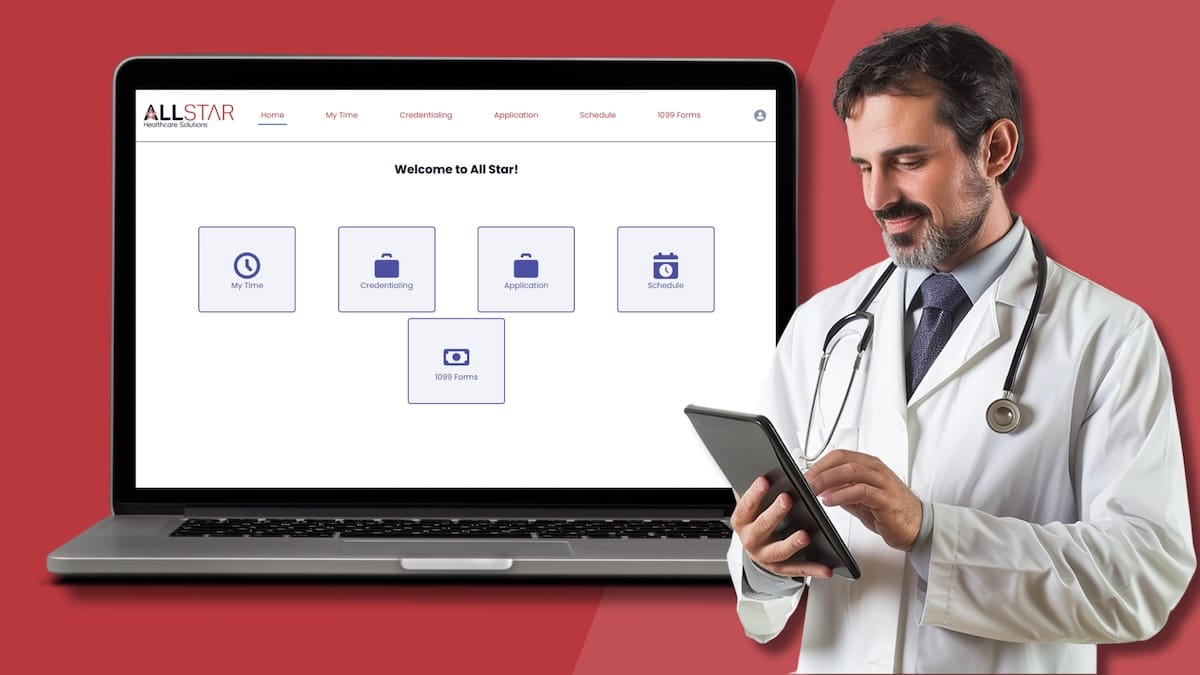
The All Star Provider Portal

Your Most Important Tasks.
All in One Place.

Manage your entire locum tenens experience from one secure portal. From applications and credentialing to timesheets and expenses, everything you need is organized in one place—saving you time and simplifying every step of the process.

Resources & Support

Everything you need to get started with the
All Star Healthcare Solutions Provider Portal.

The Provider Portal offers one convenient place to manage your application, credentialing documents, timesheets, and expenses throughout your locum tenens journey.

Access Provider Portal

Already have an account? Sign in using your email address and password.
Having trouble accessing your account? Contact us at [email protected]

What you’ll need to get credentialed.

To begin, sign in to the portal to complete your Provider Application and upload any required supporting documentation under Credentialing.

All documents must be current and unexpired at the time of submission. Once uploaded, you can manage your credentialing documents and track their status directly within the portal.

Download Checklist

Need assistance? Contact your All Star consultant or our portal support team at [email protected].

All Star Credentialing Packet

The following requirements are to be completed in the All Star Healthcare Solutions Provider Portal.

Provider Application
Release & Authorization
Background Check Release Form
Professional Liability Supplemental Claims Form
W-9 and Direct Deposit
Independent Provider Agreement

Clinical Capabilities Form

Your credentialing specialist will provide all required forms.

Copies of the following supporting documents:

Clear copy of Driver’s License
Current Curriculum Vitae (CV, in month/year format)
State Licenses (copies of all active)
Social Security Card or current copy of US Passport
Federal DEA Certificate (copies of all active)
State Controlled Substance Licenses (copies of all active)
BLS, ACLS, ALSO, ATLS, PALS, NRP Certificates (copies of all active)
Board Certification
Medical School Diploma
Post-Graduate Training Certificates
ECFMG Certificate (if applicable)
Continuing Medical Education (last 24 months)
Case Logs (last 24 months)
Immunization Records (incl. recent TB test/CXR, Hep B, MMR, Varicella, Flu)
State Required Courses (if applicable — e.g. NY Infection Control, NY Child Abuse)

Provider Portal Demo Video

Watch a quick walkthrough to get started with the Provider Portal.

Provider Portal preview

Contact & Support

Portal Support

For portal access, login assistance, technical issues, and general portal inquiries.

[email protected]

Assignment Questions

For scheduling, assignments, travel arrangements, and placement-specific questions, please contact your All Star consultant directly.

Locum tenens & permanent positions, built around you.

Submit your application and credentials to be considered for locum tenens and permanent opportunities across our nationwide network. No account required — our team reviews every submission.

Join our talent network

Frequently Asked Questions

I forgot my password. What should I do?
Select Forgot Password on the login screen and follow the prompts to reset your password.
What if I didn’t receive my welcome email?
If you can’t locate your welcome email, please check your spam or junk folder. If you still can’t find it, contact your consultant or email [email protected] for assistance.
What is the new Provider Portal URL?
You can access the portal login page at provider.allstarhealthcaresolutions.com/s/login.
Can I access the portal on my mobile device?
Yes. The Provider Portal is accessible from most mobile devices and modern web browsers.
What happens if I did not work a scheduled shift?
Open the applicable timesheet and select Did Not Work from the Shift dropdown menu before submitting.
What happens if I work later than my scheduled time?
Update the Time In and Time Out fields on your timesheet to reflect the hours actually worked before submitting.
How do I log a 24-hour call?

If you were on a 24-hour call assignment, log your time using two separate Shift types:

  • Daily OnCall (24 hr): Enter the full 24 hours you were on call (for example, 7 a.m. to 7 a.m. the following day).
  • Hourly CallBack Rate: If you were called back into the facility during your on-call period, create a separate entry using your actual Time In and Time Out. Only record the hours you were actively working during the callback.

This means you’ll have one Daily OnCall entry for the full on-call period and a separate Hourly CallBack entry for any time you were called in to provide patient care.

How long do providers have to submit their timesheets?
Providers should submit their timesheets within 24 hours of completing their last shift for the week. Submitting your timesheet on time helps ensure accurate and timely payment.
What expenses qualify for reimbursement?

Approved expenses may include:

  • Flights
  • Lodging
  • Rental cars
  • Fuel
  • Other assignment-related expenses approved by All Star

Actual expenses that qualify for reimbursement will be communicated to you by your consultant. Expenses submitted outside approved guidelines may be rejected and returned for correction.

How long does credentialing take?

Credentialing timelines vary by assignment and facility. Your All Star credentialing specialist will keep you informed throughout the process.

You can help keep the process moving by completing credentialing requirements as soon as possible and regularly monitoring the portal for any outstanding documents or action items.